Amy Yu
Product Design Lead · Minneapolis

Complex systems, real people.
15+ years designing where they meet.

It looks simple. That's the work. AI just gets me there faster.

I synthesize complex ideas, data and structures into experiences so clear that people underestimate what's behind them. I've done it as a designer, researcher and design team leader at Symantec, Optum, UnitedHealth Group and Pipefy, and today as a lead designer on a national federal health care program. With AI as my thought partner, ideas move quickly from concept to tested prototype, so teams reach development with confidence.

2024–Now · Lead story

Mapping a national health care program from the user's perspective

On a cross-functional discovery team, I led the user-side analysis that shaped 17 workstreams, then created the personas, journeys and blueprints a UX team of 14 now builds on.

Read the story ↓
  1. The bidA national federal program, read through the user's eyes
  2. The mapWorkstreams and the jobs to be done in each
  3. The peoplePersonas and journeys for every user type
  4. The blueprintThe foundation the UX team still builds on
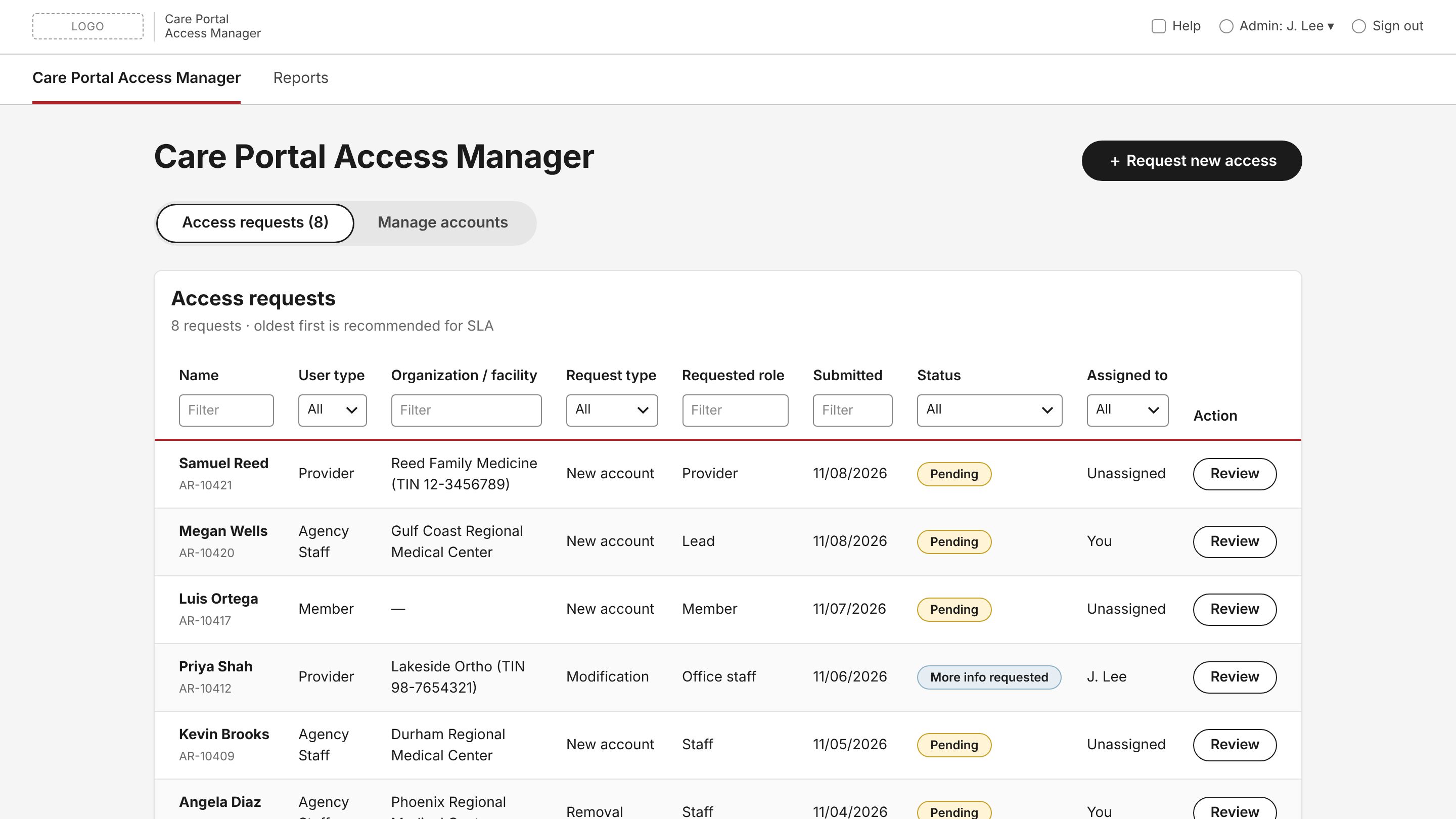
More from the program Access Manager request queue from the portal access prototype
Workstream deep dive · In development

Portal access: one front door for four kinds of users

One access system for four roles, built as a working prototype with Codex, plus an agentic concept that showed a team new to AI what's possible.

Result In development, with engineering building from the working prototype.

Read the case study ↓
Quality analyst dashboard with caseload metrics and a work queue
Workstream highlight · Exploration

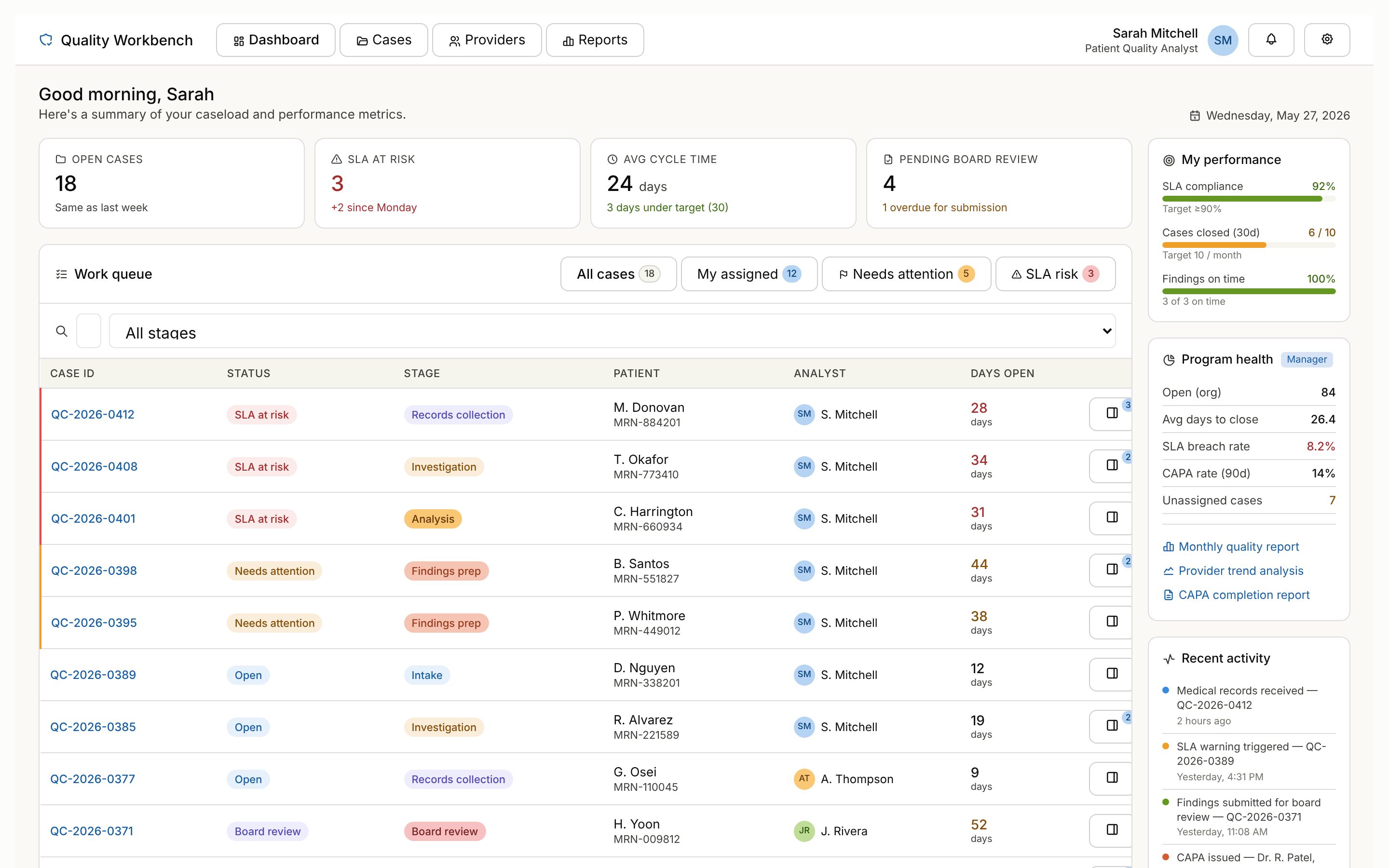
Patient safety reviews: mapping the hand-offs behind every case

Five roles and four hand-offs behind every safety case. I mapped them, drew the line on where AI acts, and explored each role's workflow with Claude.

Result The blueprint, the line on AI and a rapid research method carried forward after the build moved to a vendor.

Read the highlight ↓
Earlier experience
2022–2023

Redesigning Pipefy's marketing site architecture to grow the funnel

B2B workflow SaaS · Stakeholder interviews, heuristic review, unmoderated testing, phased rollout · Mentored junior UXers

+62% sign-ups+124% demos booked

1-month A/B test: some users were routed to the new navigation while everyone else saw the old site.

2017–2020

Building a design team and bringing UX into the product lifecycle

UnitedHealth Group · Team leadership, UX process, career growth

2016–2017

Making new login security usable across four UnitedHealth Group products

UnitedHealth Group / Optum · 5 lab studies and a guerrilla test with 79 participants, rolled out to MyUHC, Health4Me, OptumRx and Optum Bank

Lead story · Federal health care program

Mapping a national health care program from the user's perspective

The request for proposals for a national federal health care program ran over 200 pages. On a cross-functional discovery team, I brought the user experience lens, working with a UX architect before there was a design team in place.

At a glance
Problem
Siloed functional departments with no view of how their work came together for the user
My role
Lead designer, acting as UX architect, on a cross-functional discovery team
What I did
Led the user-side analysis that shaped 17 workstreams, and defined the jobs to be done within each
Result
Initial personas, journeys and blueprints for a UX team that grew from 2 to 14
The challenge

A program too big to see all at once

Before anyone could design a screen, the team had to turn the bid into parts a team can own. My part was the user side: who the program serves and what they need to get done.

The discovery · AI-assisted

From a contract to a map of the program

  1. SynthesizeUsed AI to distill the full proposal into core jobs to be done, in hours instead of days.
  2. ValidateChecked those jobs in stakeholder interviews and against current process documentation before building on them.
  3. StructureLed the user-side analysis that shaped 17 workstreams.
  4. GroundDrafted initial personas, user journeys and service blueprints for the work ahead.

AI did the first pass. The UX judgment calls were mine: which needs belong together, where one experience ends and the next begins, and what to check with stakeholders first.
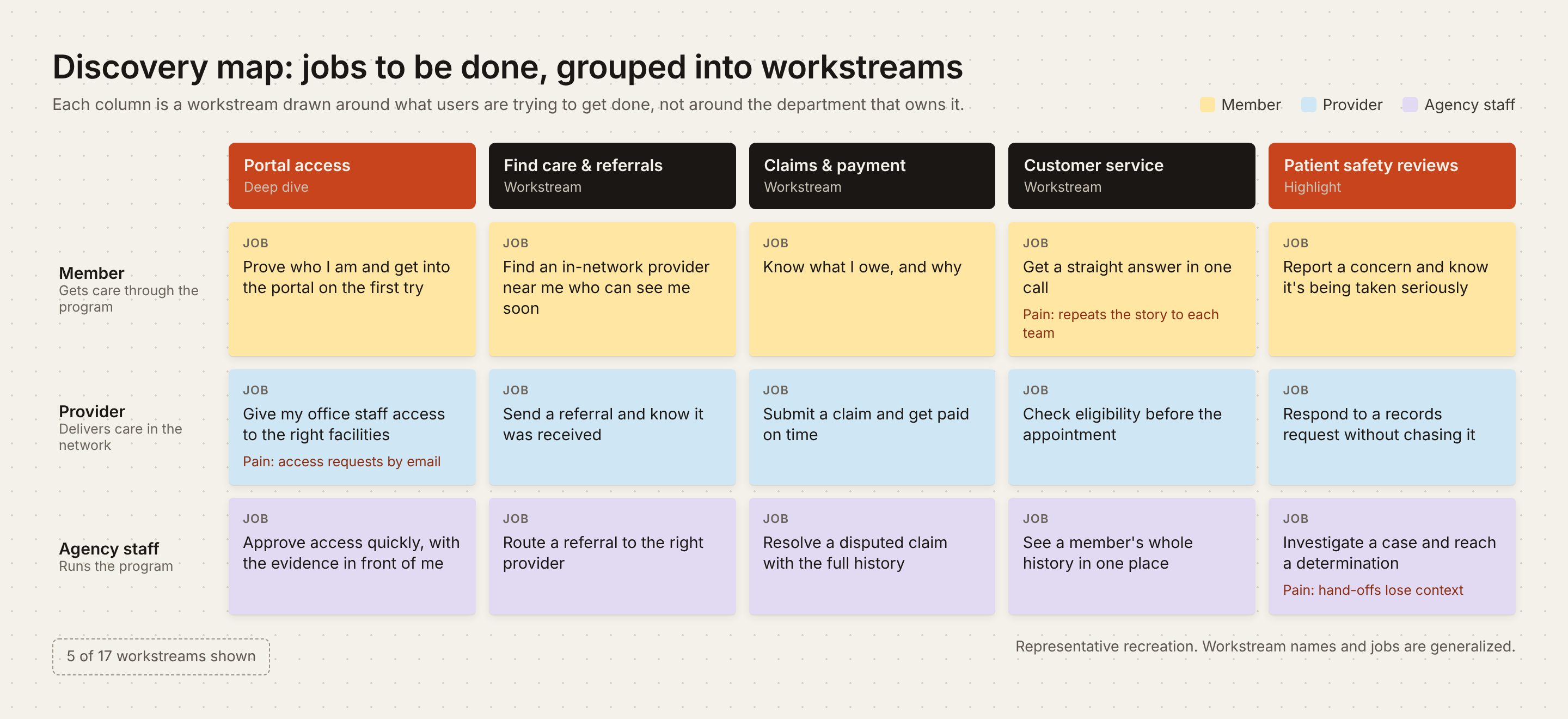
Discovery map: a grid of jobs to be done for Members, Providers and Agency staff, grouped into five of the 17 workstreams, including portal access and patient safety reviews
The discovery map. Jobs to be done for each user type, grouped into workstreams. Representative recreation: names and jobs are generalized.
Portal accessPatient safety reviewsSelf-service portalsCustomer serviceClaimsReferralsCase routing+ 10 more

Highlighted: the two workstreams shown below.

The outcome

A foundation a whole team could build on

As the UX team grew from two people to fourteen, discovery gave every new designer and researcher a starting point.

UX at discovery
  • Me, lead designer acting as UX architect
  • 1 UX architect
UX team today
  • 8 designers, including me
  • 1 UX architect
  • 2 researchers
  • 2 content strategists
  • 1 accessibility specialist

The portal access deep dive and the patient safety highlight below show what came next.
Deep dive · Portal access workstream

Portal access: one front door for four kinds of users

Members and Providers can't manage care until they get into the portal. I used Codex to build a working prototype that engineering now uses as its reference, then an agentic version to show a team new to AI what's possible.

At a glance
Problem
Access ran on emails, calls and tickets, and admins chased missing details by hand
My role
Lead designer for the workstream · Codex, Figma · 508 compliance
What I did
Designed one access system for four roles and built it as a working prototype
Result
In development now, designed to reduce approval to a quick quality check
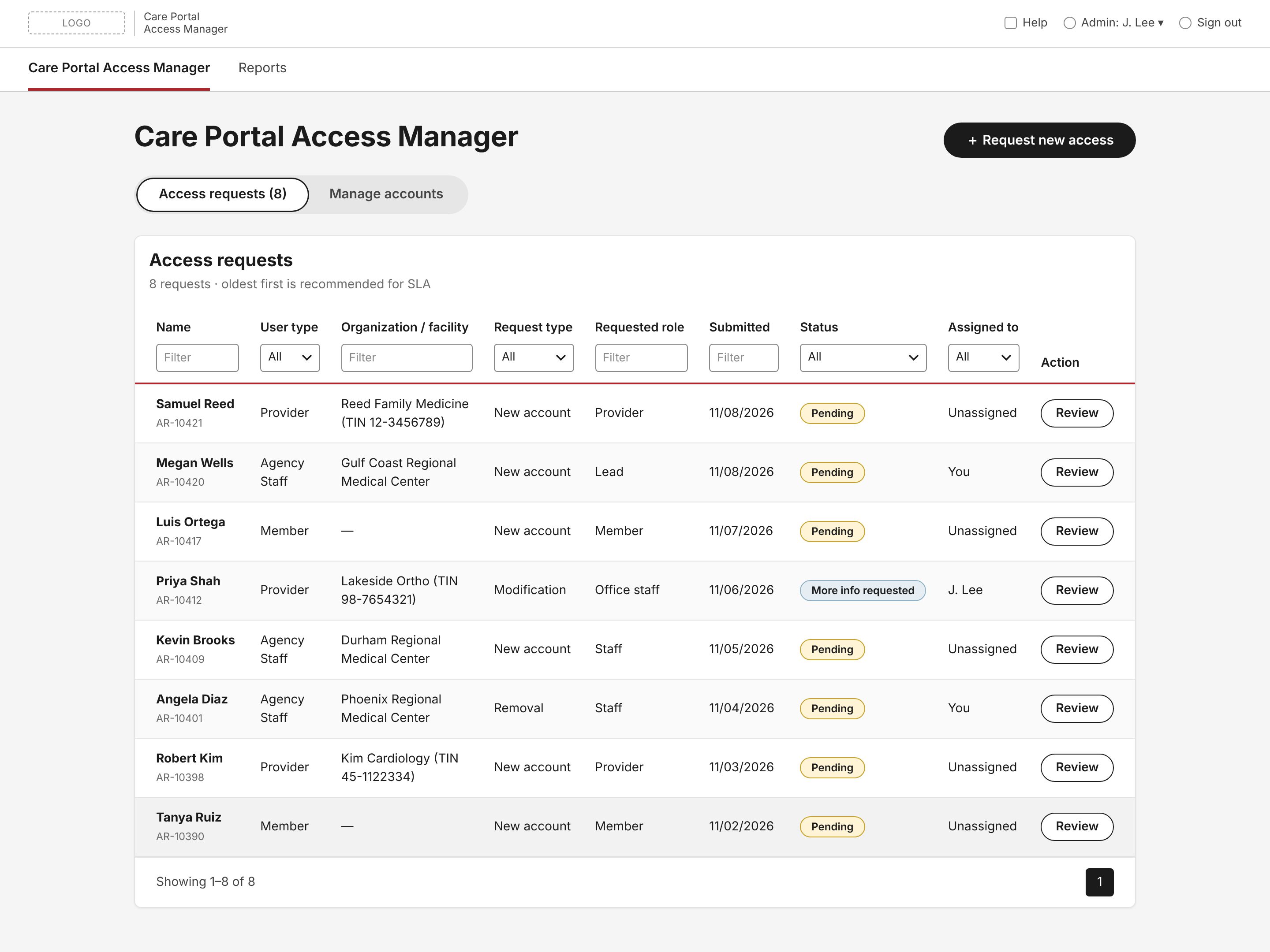
Care Portal Access Manager: a filterable queue of eight pending access requests from Providers, Members and Agency Staff
The Access Manager queue. Every request across user types, worked oldest first to meet the SLA. Representative recreation: facilities, people and requests are fictional.
The challenge

Access is the front door to care

Portal access is the front door: proving who you are, what role you hold, and what you can see. Here's how getting in worked before, and how it works now.

Before
  1. Email or call the call center
  2. Request routed through a ticketing platform
  3. Admin guesses at the setup, or follows up to ask
  4. Admin checks eligibility by hand
  5. Admin grants access manually
After
  1. System checks eligibility automatically
  2. User requests access in a structured form, choosing exactly the role, permissions and facilities they need
  3. Admin does a quick quality check and approves

The admin still owns the decision, but the job shifts from investigating each request to confirming it.

The build · OpenAI Codex

A working prototype in place of static specs

Using Codex in our approved enterprise environment, I built a front-end prototype with sample data that engineering can build from. Engineers click through real behavior instead of interpreting static screens.

The real design work was the context

Codex is only as good as what it knows, so I treated the context as a design deliverable: everything a new designer would need to get up to speed.

See everything I gave Codex
Requirements
  • Business requirements
  • Government requirements from the contract
  • UX requirements and use cases
People
  • Personas
  • User journeys
  • Service blueprints
Design
  • Design system components and screenshots
  • Related interaction patterns
  • Low-fi concept wireframes
  • Content map
Grounding
  • Realistic sample data
  • Internal documentation and resources

Our design system had no direct connection to Codex yet, so I worked around it. I collected the components and screenshots myself and gave them to Codex, so the prototype looked like the final product, not a generic mockup. Including the contract meant every screen could be traced to what the government asked for, not just what our team wrote.

Showing the business what they asked for

Requirements were still shifting. When a new ask came in, I built it into the prototype and showed it. Seeing it working, the business could tell whether it was what they wanted and change direction before anything reached development.

A clickable answer settles a debate faster than a page of requirements.
A 3-minute walkthrough of the working prototype. Live prototypes available to walk through in an interview.

One system, four roles

Access looks like one form, but it's four journeys that meet in one approval queue: Members, Providers, Agency Staff and Access Managers. Shared patterns mean each one only has to be learned once.

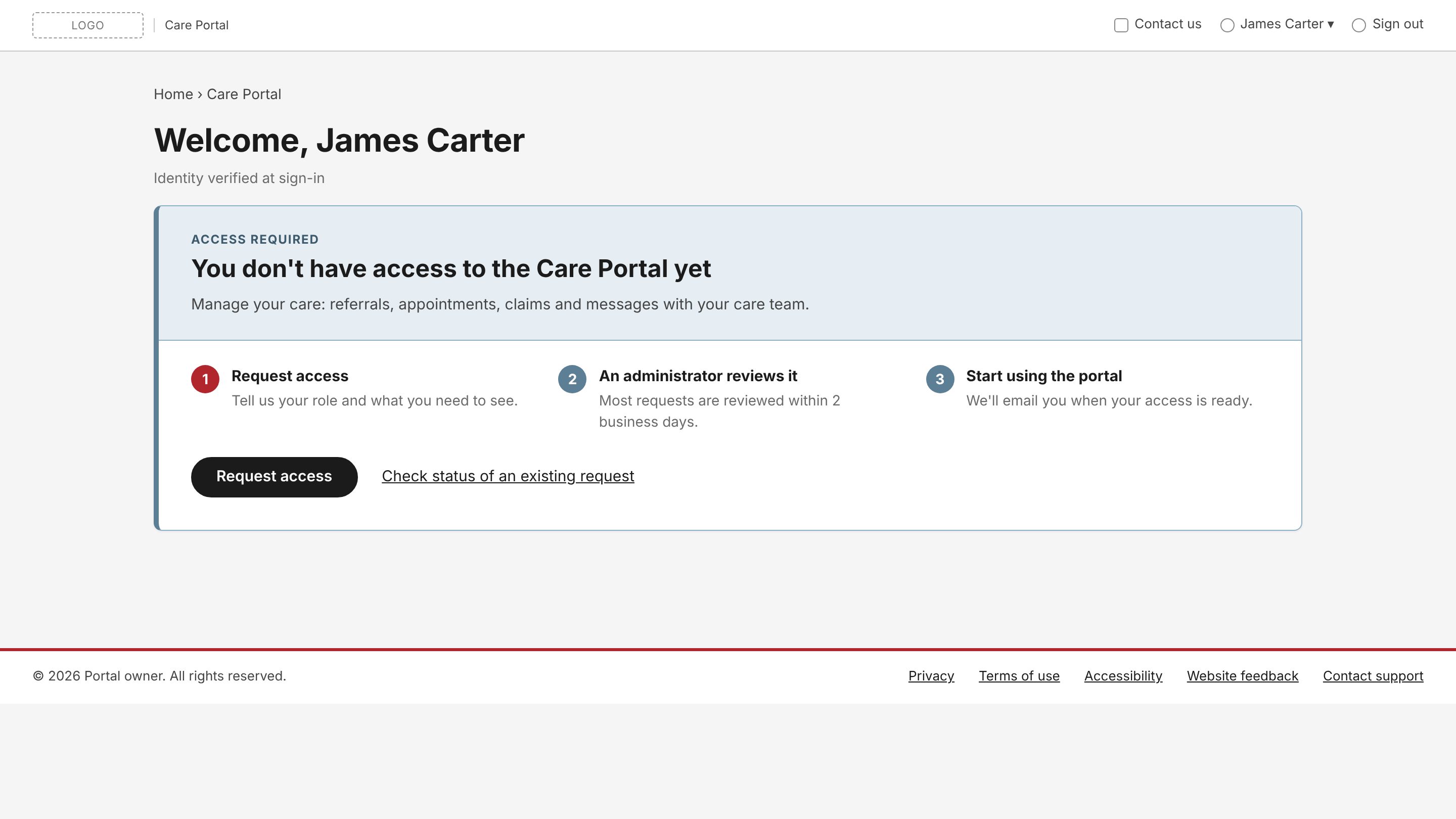
Member landing page: identity verified, request access
Member. Identity is already verified at sign-in, so the ask is short.
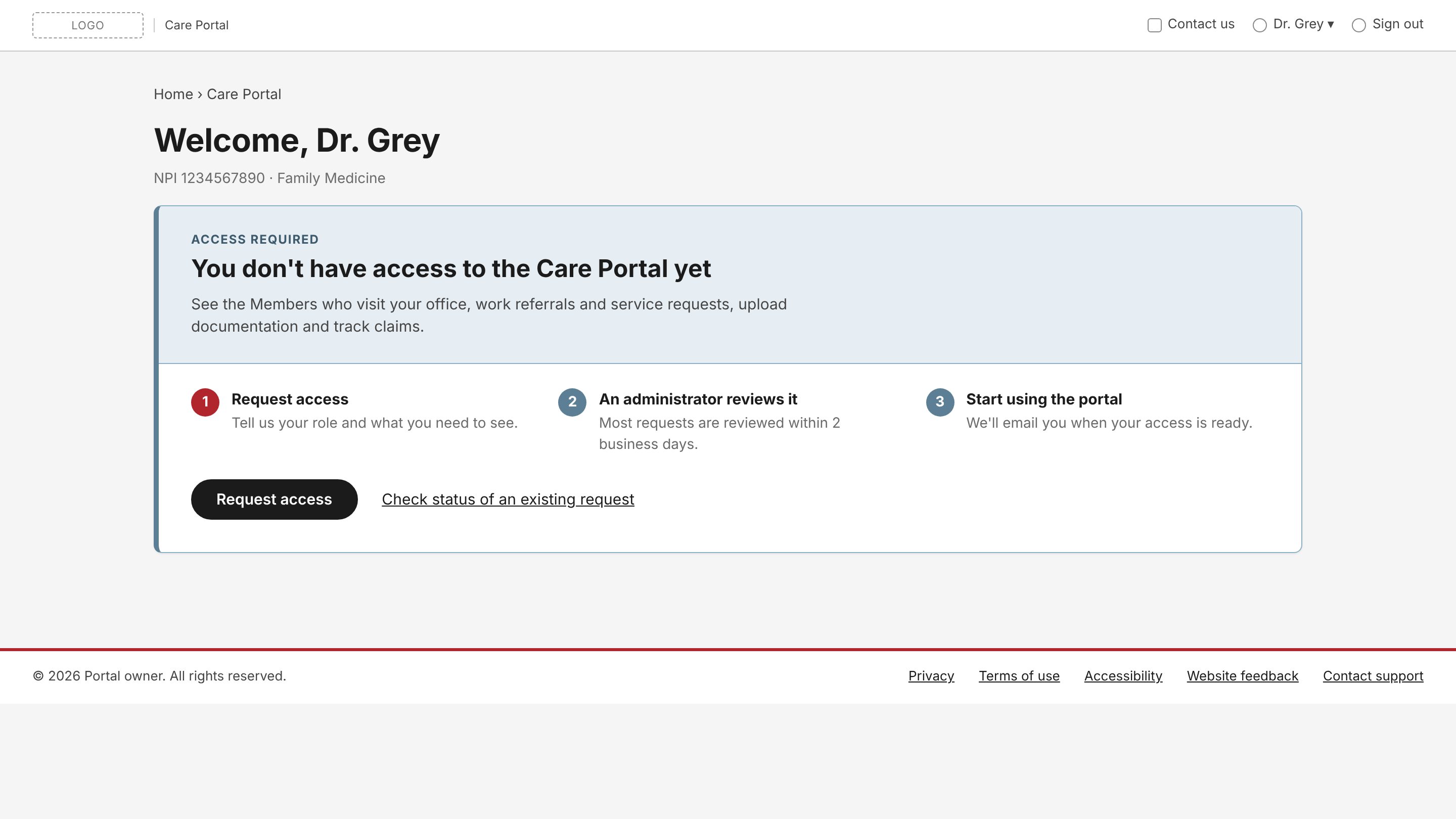
Provider landing page
Provider. Same entry point, copy tuned to referrals, documentation and claims.
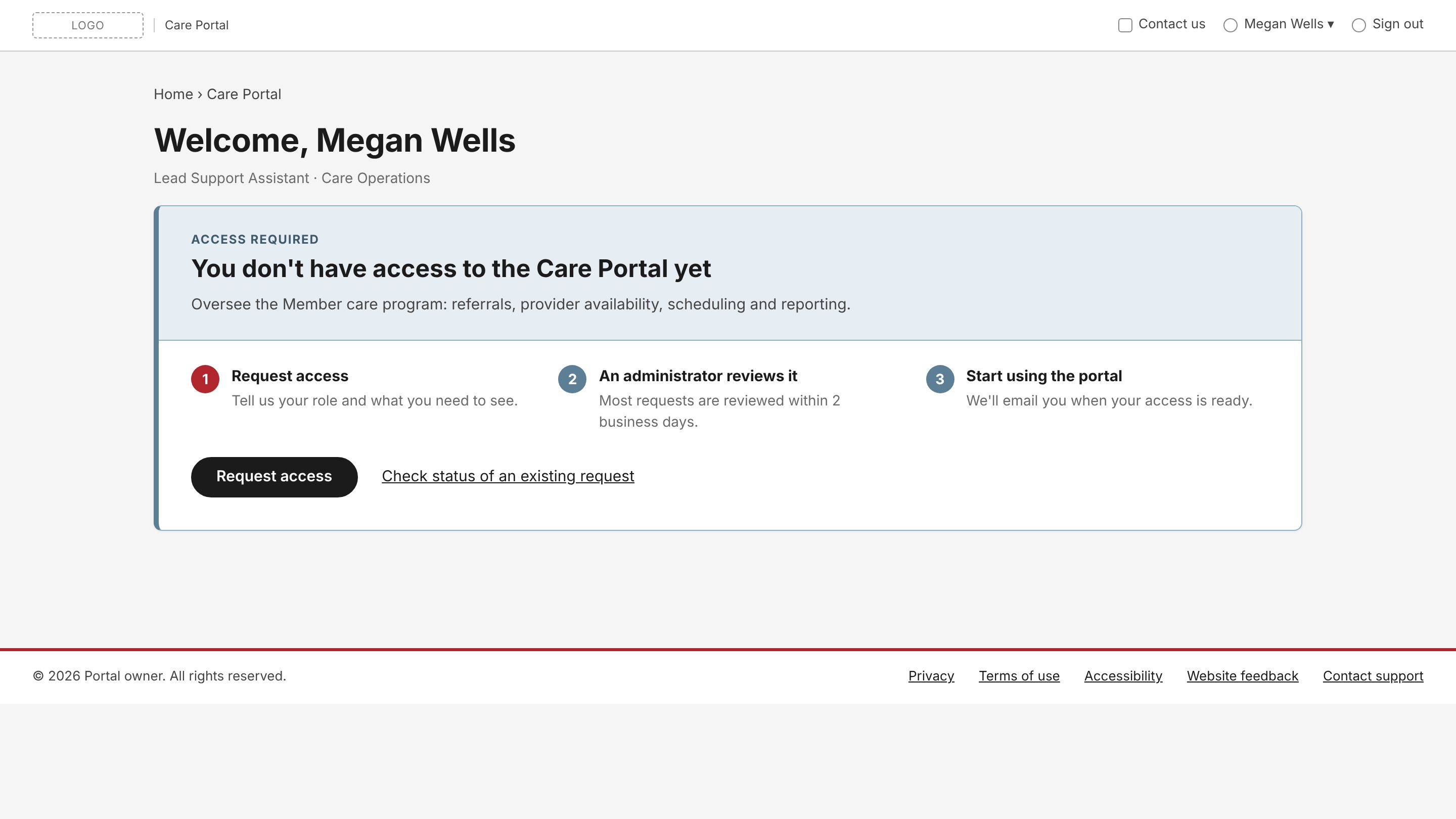
Agency Staff landing page
Agency Staff. Framed around program oversight and facility coverage.

A full request, end to end

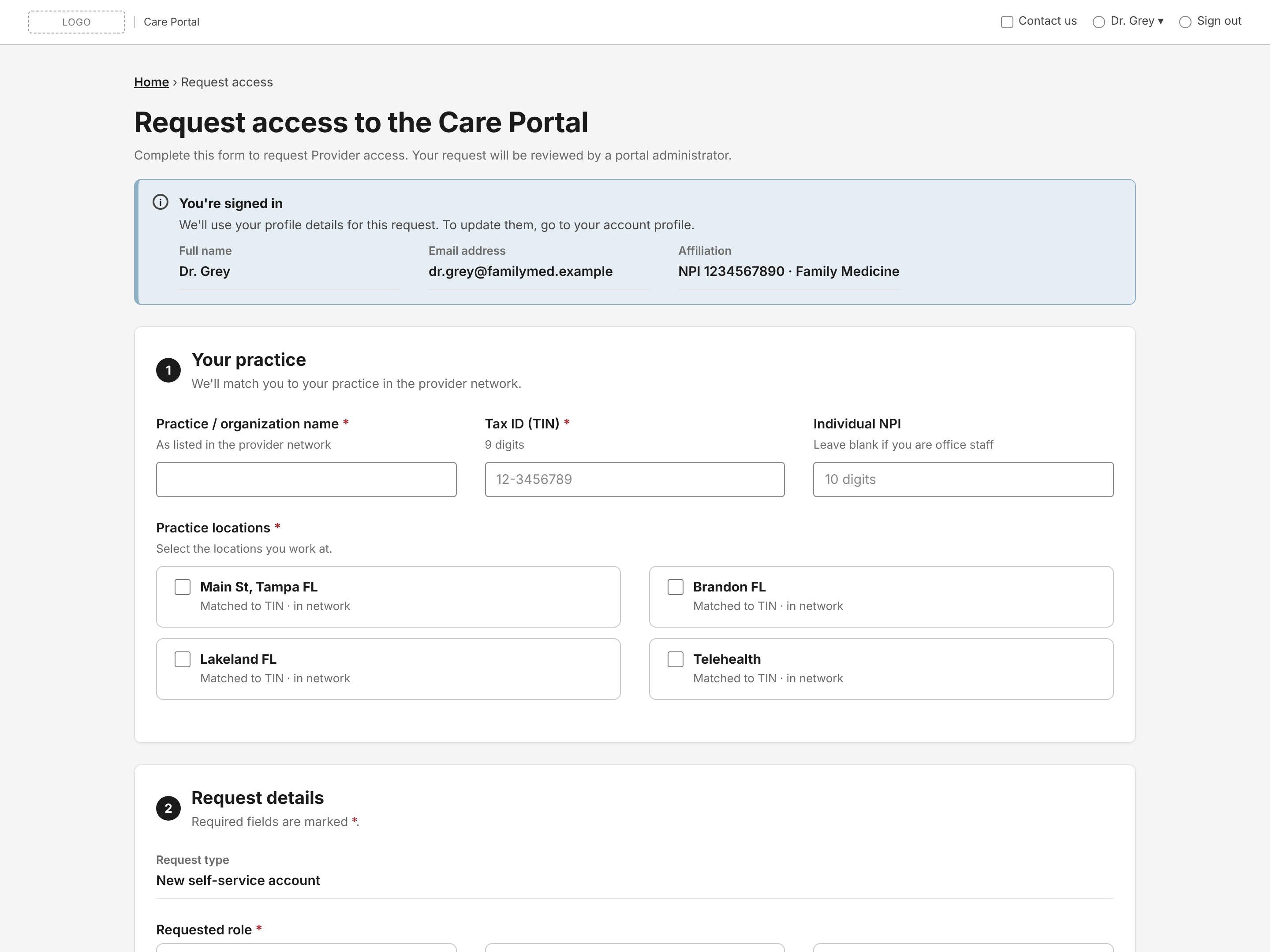
Provider access request form with profile pre-filled and practice details section
01Request. Pre-filled from sign-in, so Providers only answer what the system can't know.
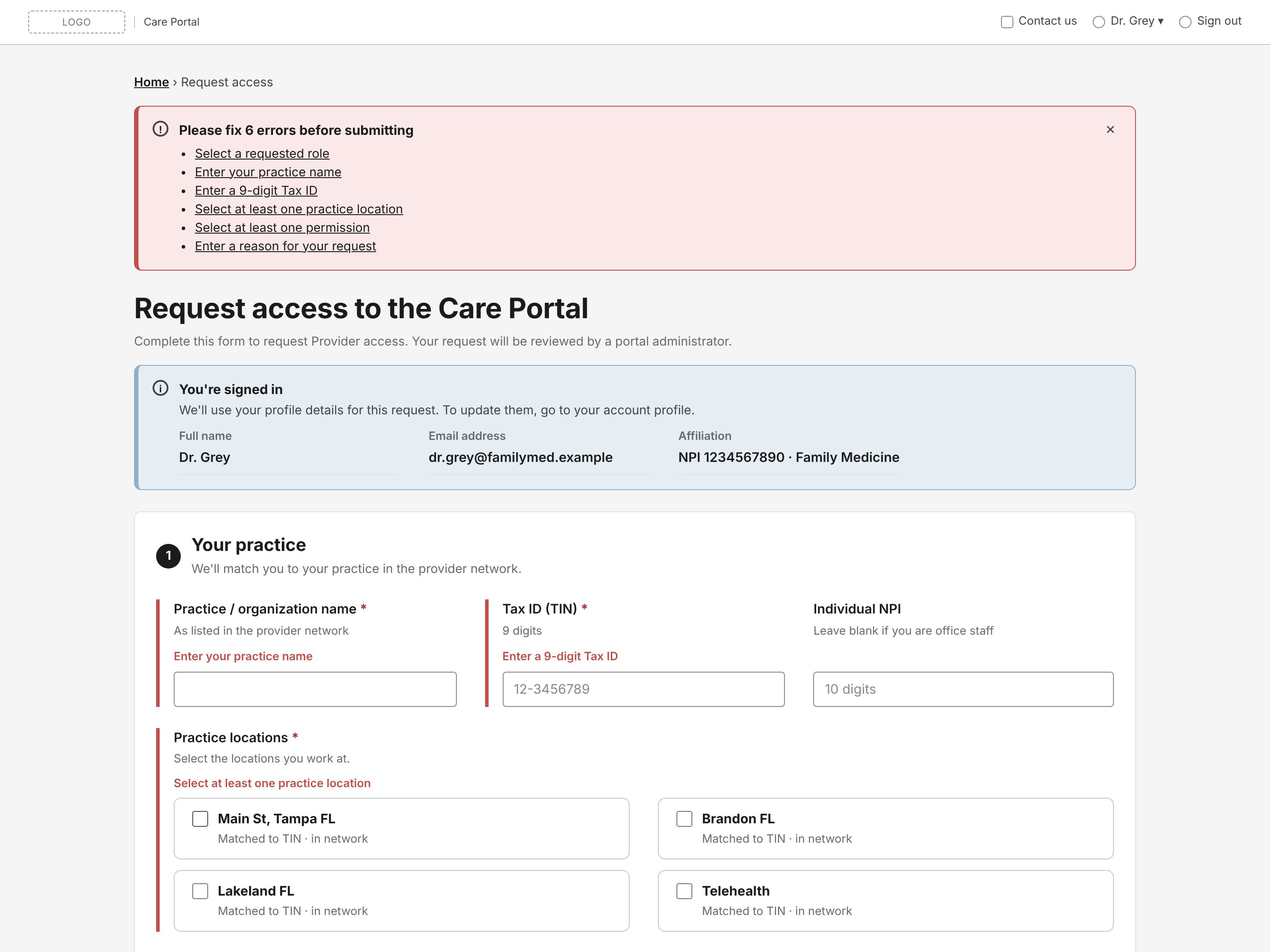
Error summary listing six problems, each linked to its field, with inline errors
02Recover. Errors link to each field and say exactly what to fix, a Section 508 pattern.
Access request queue with status, assignee and per-column filters
03Triage. The request lands in one queue with status, assignee and age.
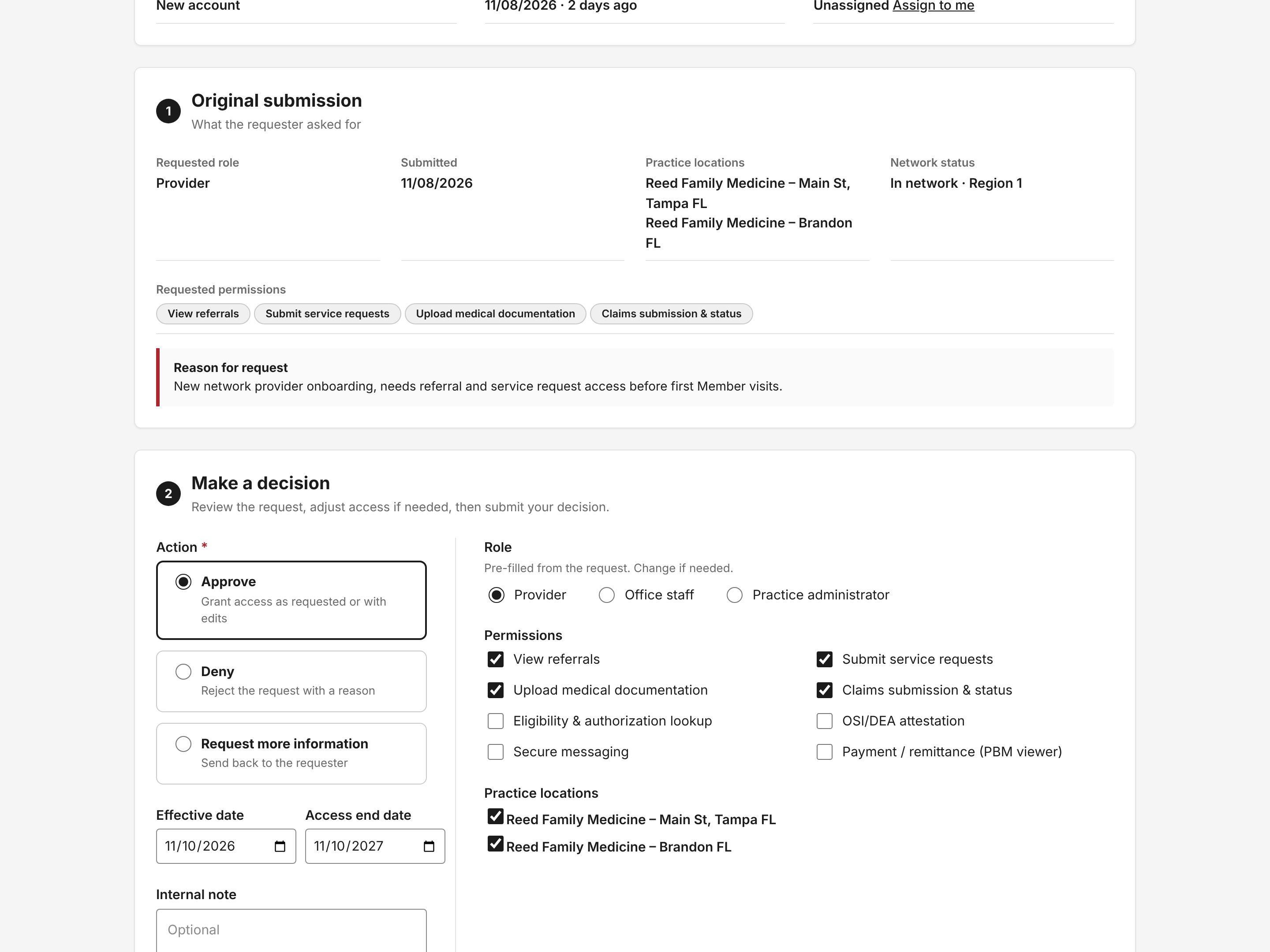
Review screen showing the original submission and an approve decision with editable role and permissions
04Decide. Approving pre-fills role and permissions, and every action is logged.

Annotated for engineering

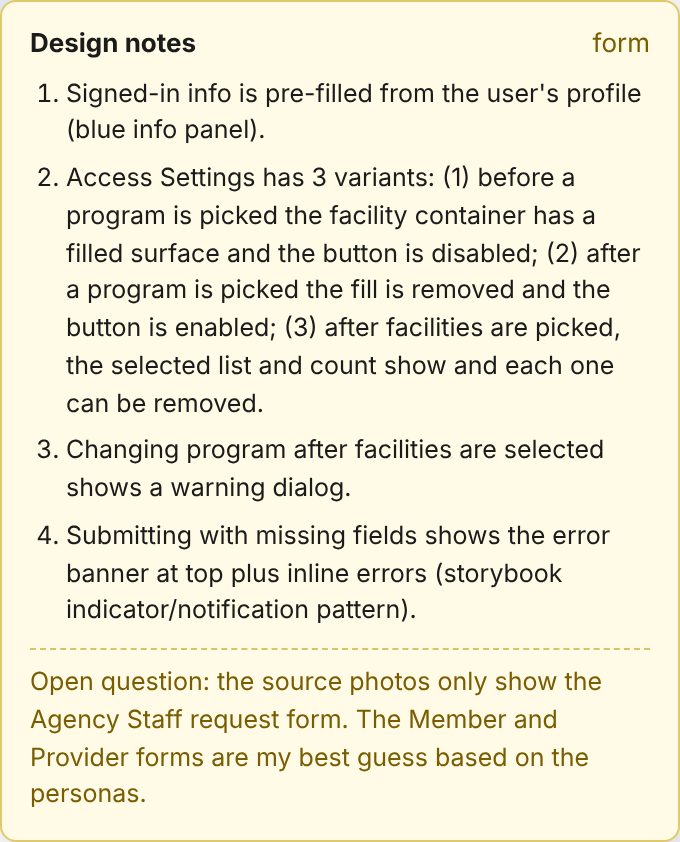
Every screen carries design notes on states, rules and open questions, so developers read the reasoning next to the behavior. Open questions stay visible until a product owner answers them.

Design notes panel describing four states of the access settings section
Design notes toggle on and off over the live prototype.
The provocation · Agentic concept

Showing a team new to AI what's possible

My team was new to AI, and many were skeptical. I believe design is moving from fixed screens toward agentic interactions, so I built an agentic version of the same Access Manager. It was a teaching tool, not meant for immediate development.

The admin tells an agent what they need, and it finds requests, checks evidence and drafts decisions. It used the same users, data and rules as the working prototype, so the team could compare the two side by side.

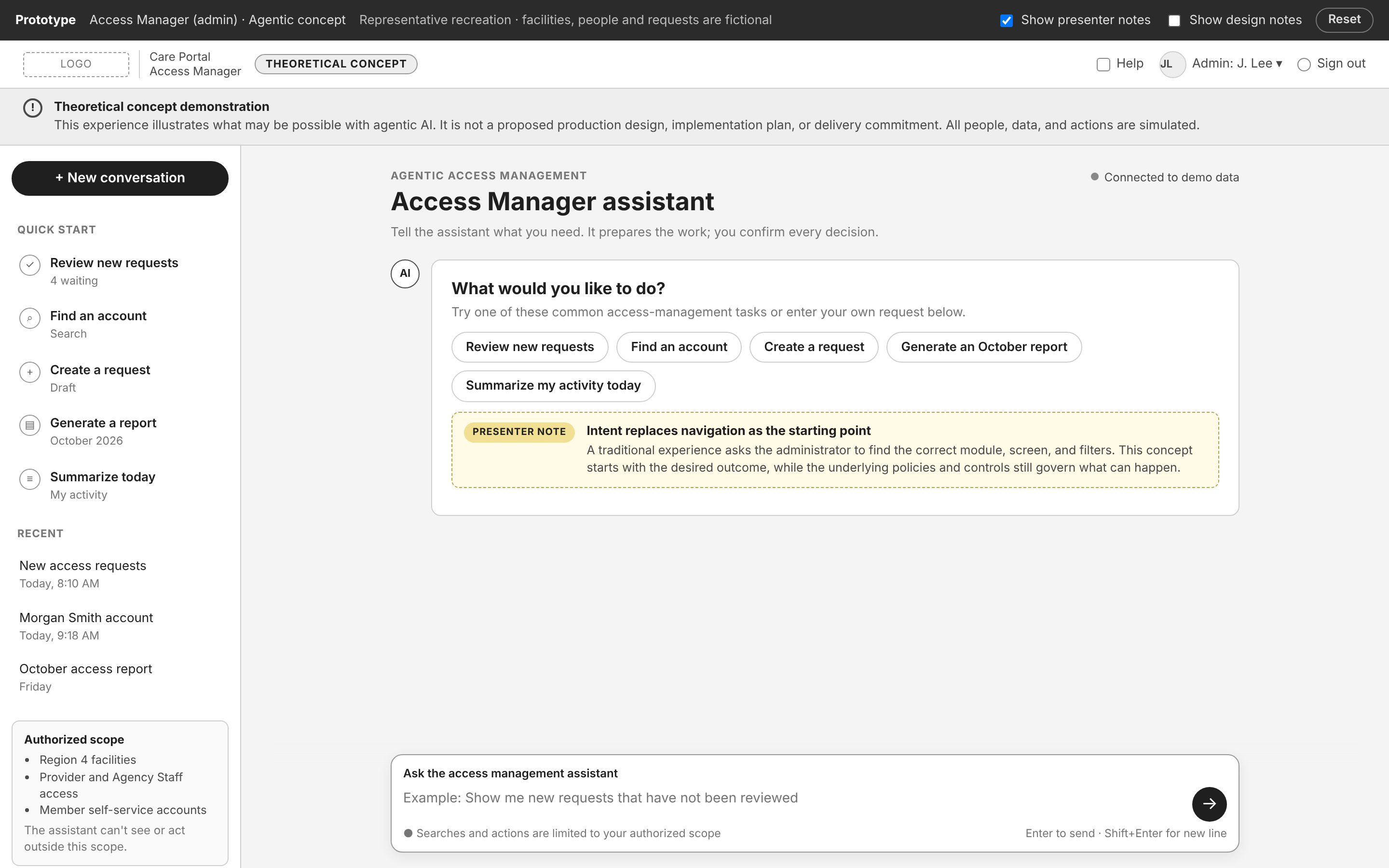
The agentic prototype was clearly labeled as a theoretical concept, not a proposed design, with presenter notes walking through each idea.

Access Manager assistant home: quick-start tasks, recent conversations, authorized scope, and a prompt box
Intent replaces navigation. The five most common jobs are one click or one sentence away.
See the agent flow, step by step
Screen-by-screen flow
  1. Open the Access Manager queue
  2. Set filters to find unreviewed requests
  3. Open each request
  4. Check identity and affiliation by hand
  5. Approve, deny, or ask for more information
Agent-assisted flow
  1. "Show me new requests that haven't been reviewed"
  2. Agent shows the filters it applied and the evidence it checked
  3. Person confirms each decision, with a reason for the audit record
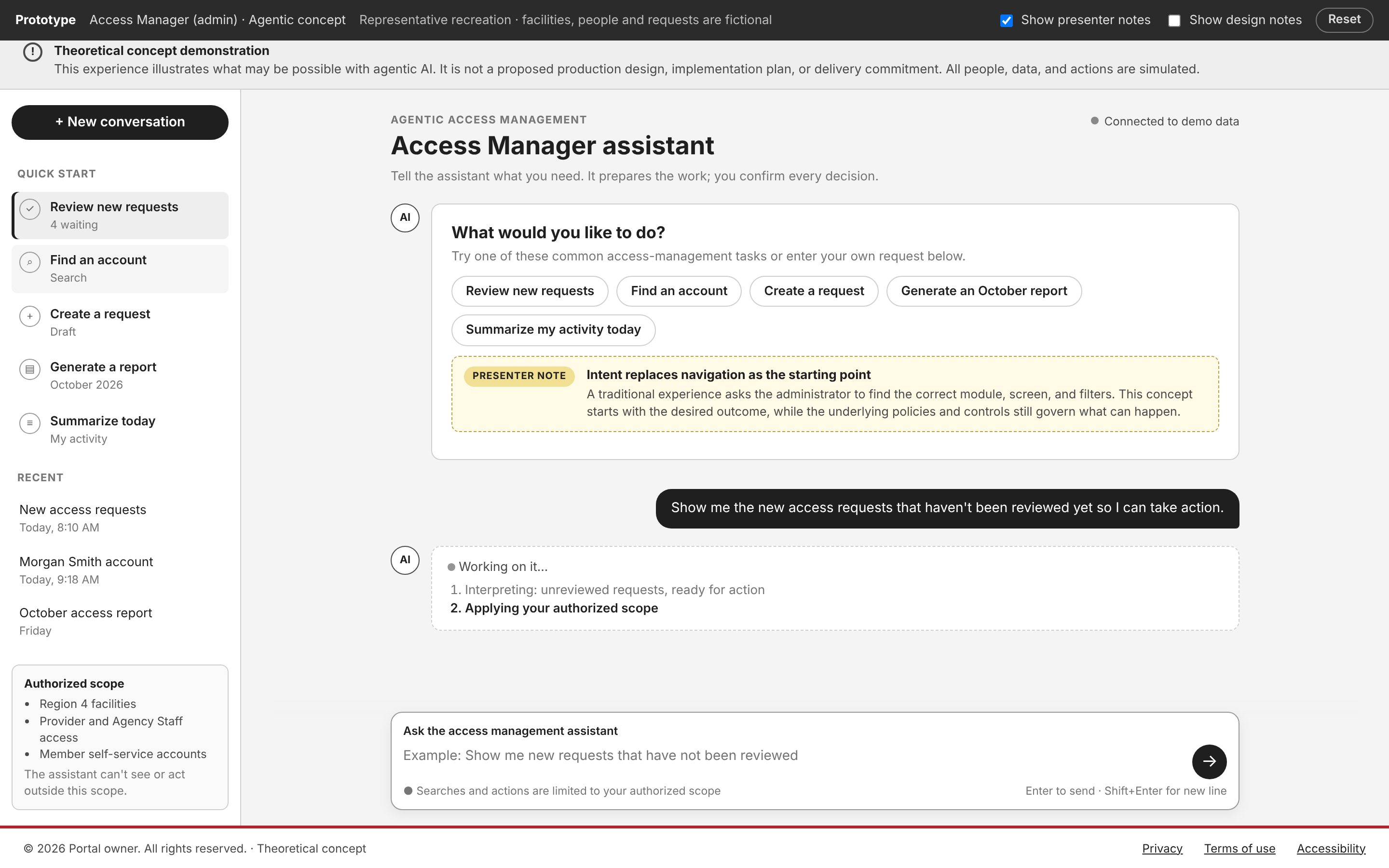
The assistant listing the steps it is taking to answer the request
01Show the work. The agent lists each step it takes, so the admin sees how it read the request.
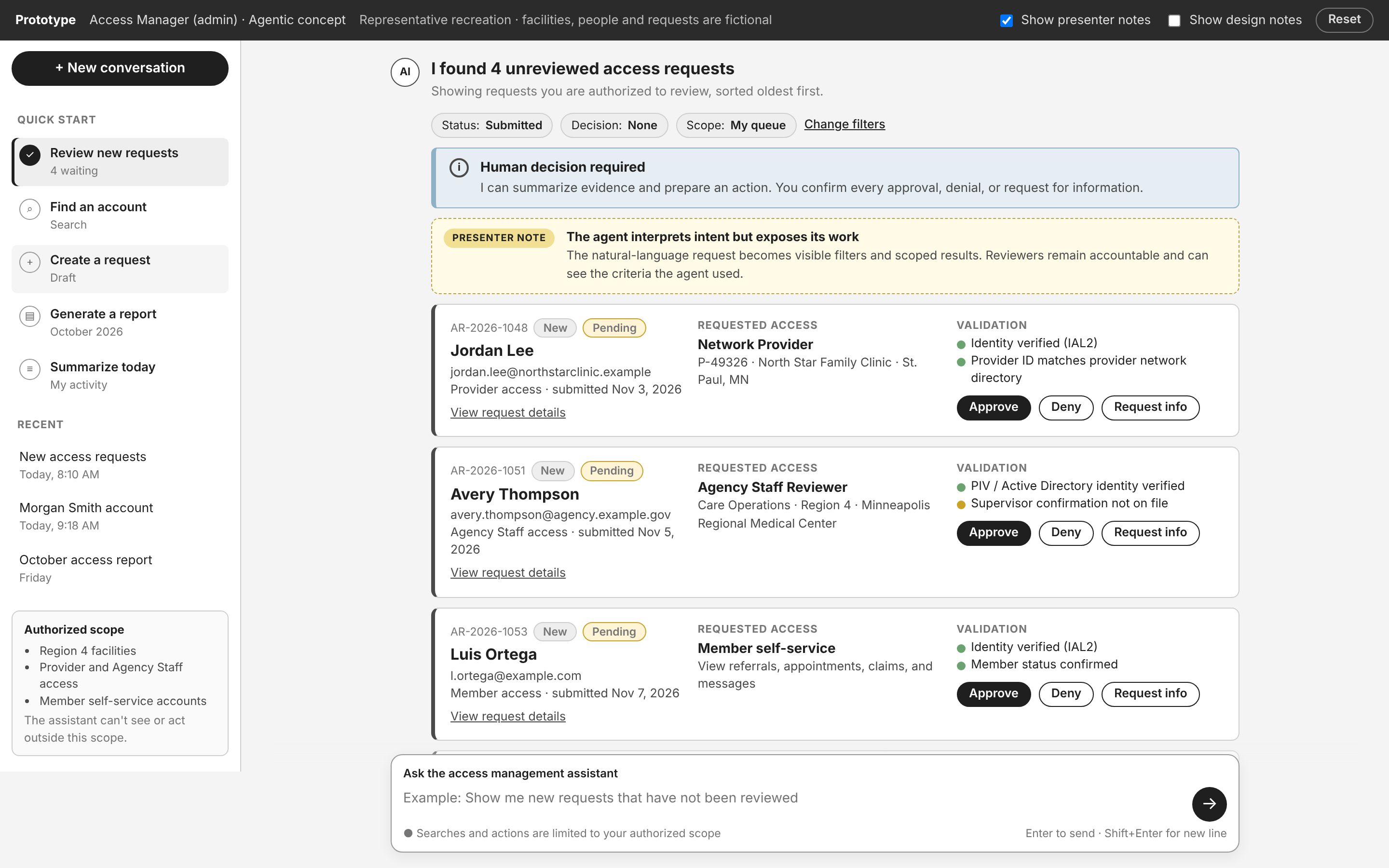
Four unreviewed requests shown as cards with the filters used and validation evidence
02Make criteria visible. The plain-language ask becomes filters the admin can see and change.
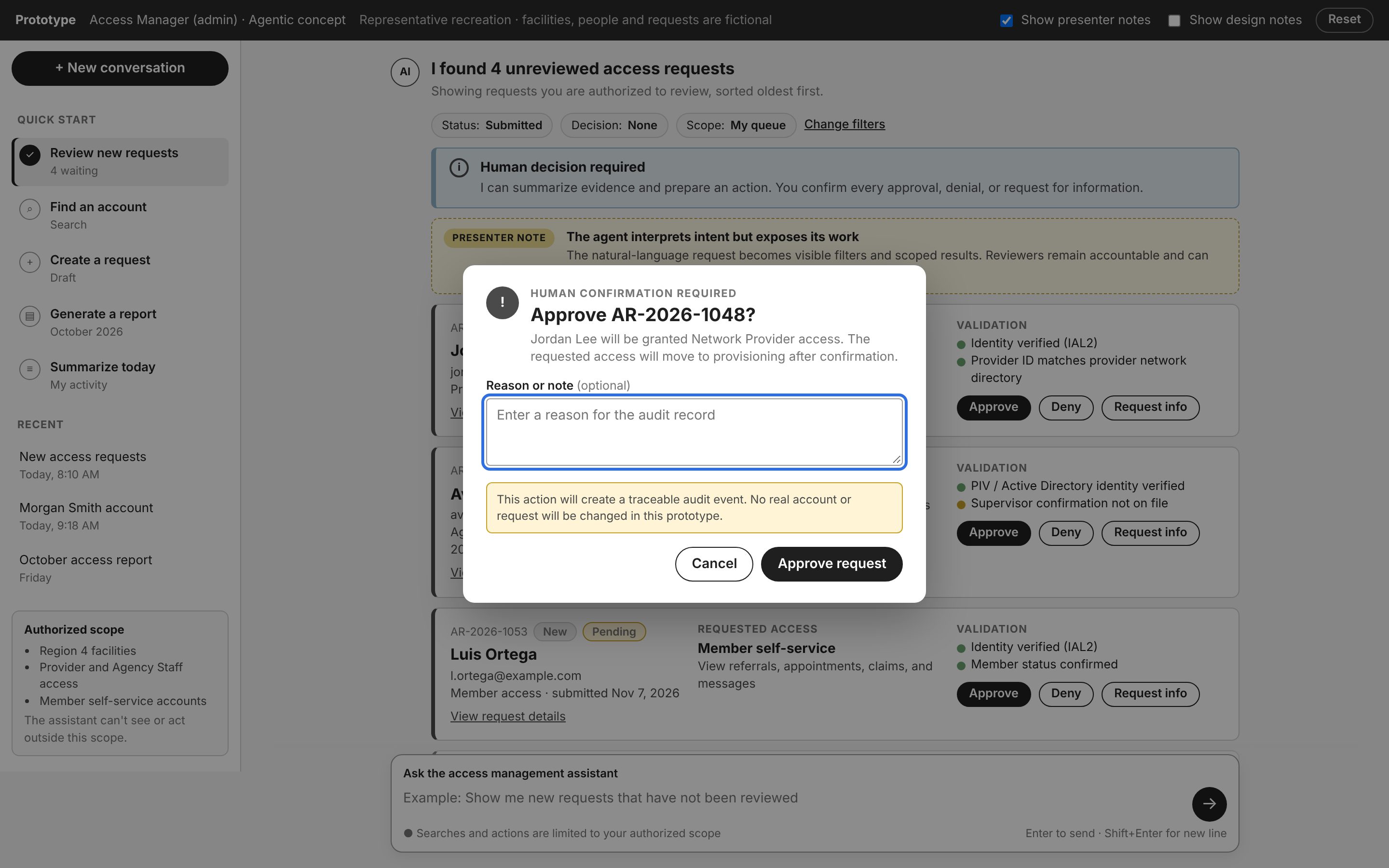
Confirmation dialog: Human confirmation required, approve request, with an optional reason for the audit record
03Hand control back. The agent prepares the decision; a person confirms it, and it's logged.
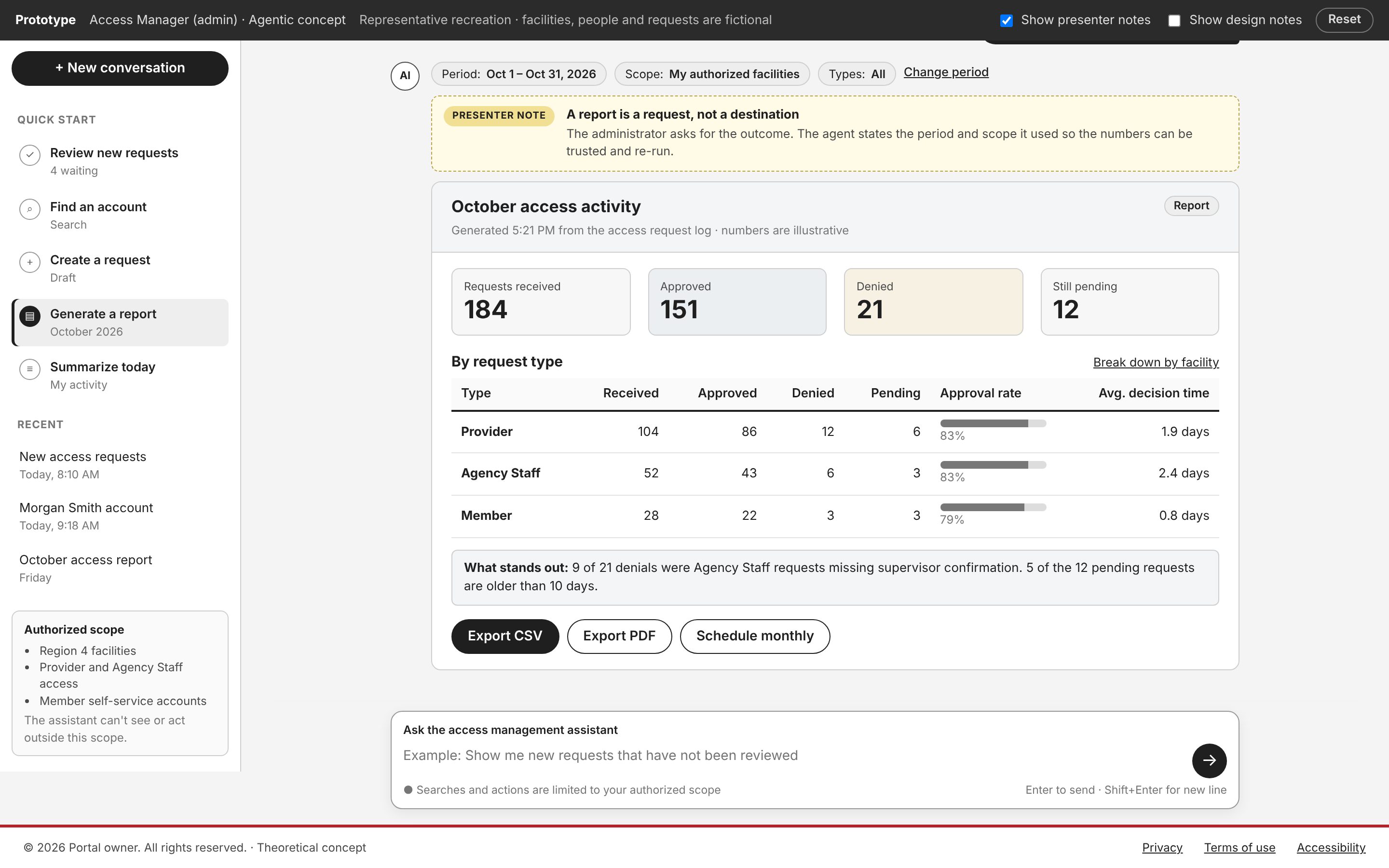
October access activity report with totals, a breakdown by request type, and a summary of what stands out
04A report is a request, not a destination. It states the period and scope used, so the numbers can be trusted.

What happened next

Reactions were mixed, as expected. Some weren't ready; others ran with it. Our UX researcher is now building an agentic way to collect user feedback. My goal was a concrete starting point for the people who were ready.

Outcomes

Where it stands

The app is in development now.

Faster decisions upstream

Now: the business sees each ask working and changes course before development.

One shared reference

Now: engineering clicks through the prototype, with design notes alongside.

Admins check, not chase

At launch: automatic eligibility and a structured request turn approval into a quick quality check.

Workstream highlight · Patient safety

Patient safety reviews: mapping the hand-offs behind every case

A safety case passes through five people and four hand-offs before it closes, and most delays happened in between: stalled record requests, scattered systems and hand-offs that lost context.

What I did
  • Mapped the work with the people who do it. I ran a service blueprint workshop, seeded with a first draft so the group could react instead of starting blank.
  • Drew a clear line on AI. Each step was tagged for where AI assists and where only a person decides. Medical board review stayed human only.
  • Explored and tested fast. I built each role's workflow as working UI with Claude, and wrote our research team a weekly rapid research method to keep pace with a vendor shipping every week.

What carried forwardThe build moved to an outside vendor. The blueprint, the line on AI and the rapid research method carried forward with the team.

Quality analyst dashboard: open cases, SLA risk, cycle time and a work queue by stage
Exploration built with Claude: the analyst's queue. Representative recreation with fictional data.
Personal practice · Built with Claude

Learning to build with AI, on my own time

Before AI reached my client work, I taught myself to build with Claude. The hard part wasn't the prompt. It was the design work that comes first: deciding what to build and why, documenting it, and turning it into instructions a model can follow. That's why I could put Codex to work on client projects the moment it arrived.

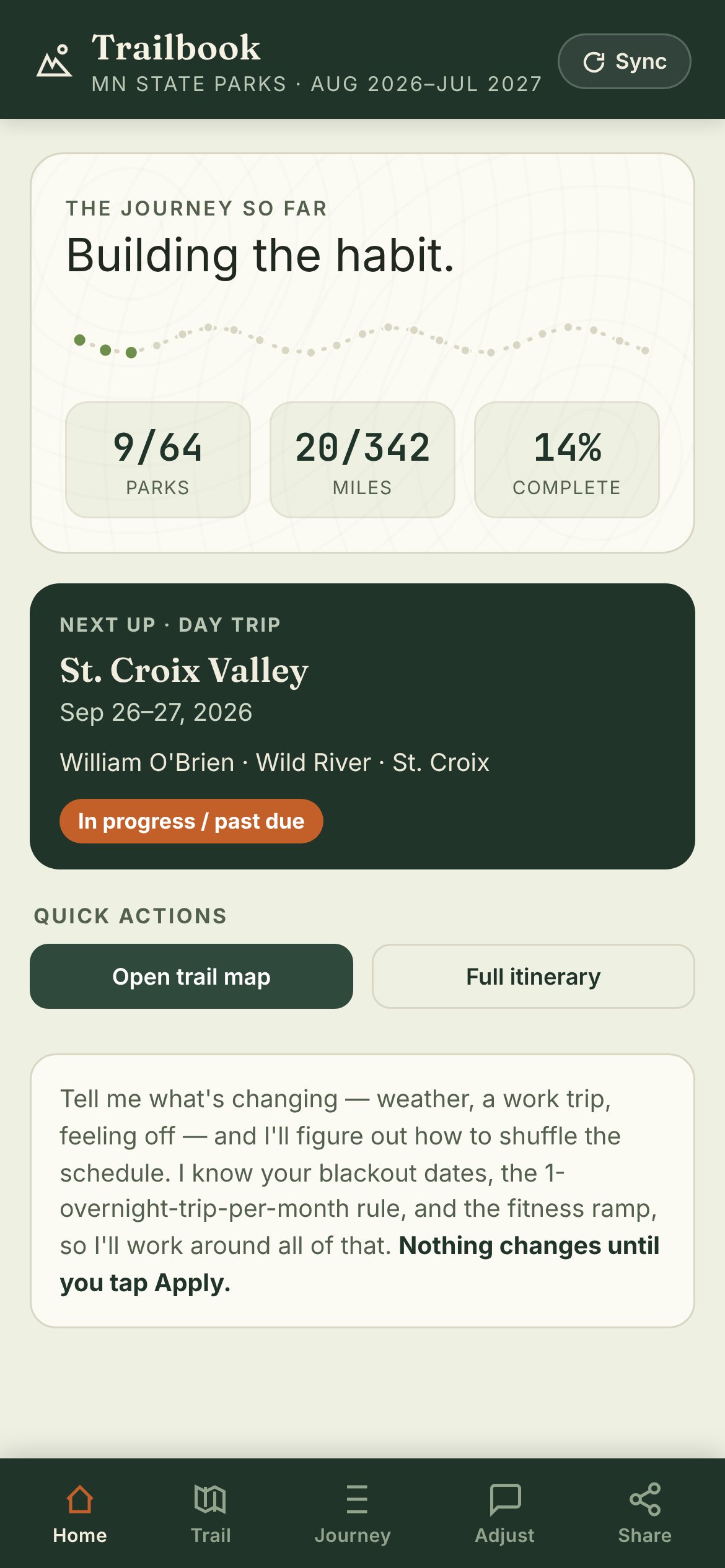
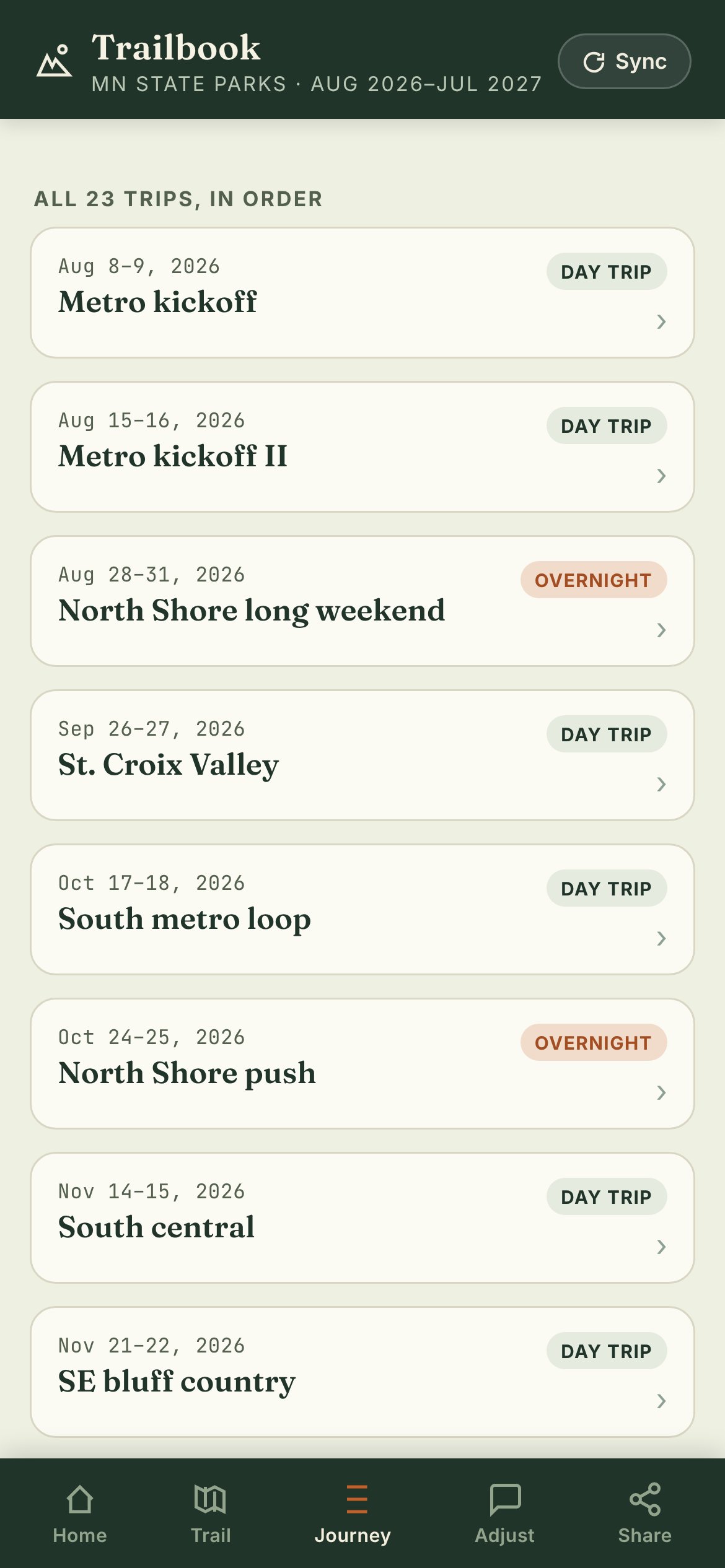
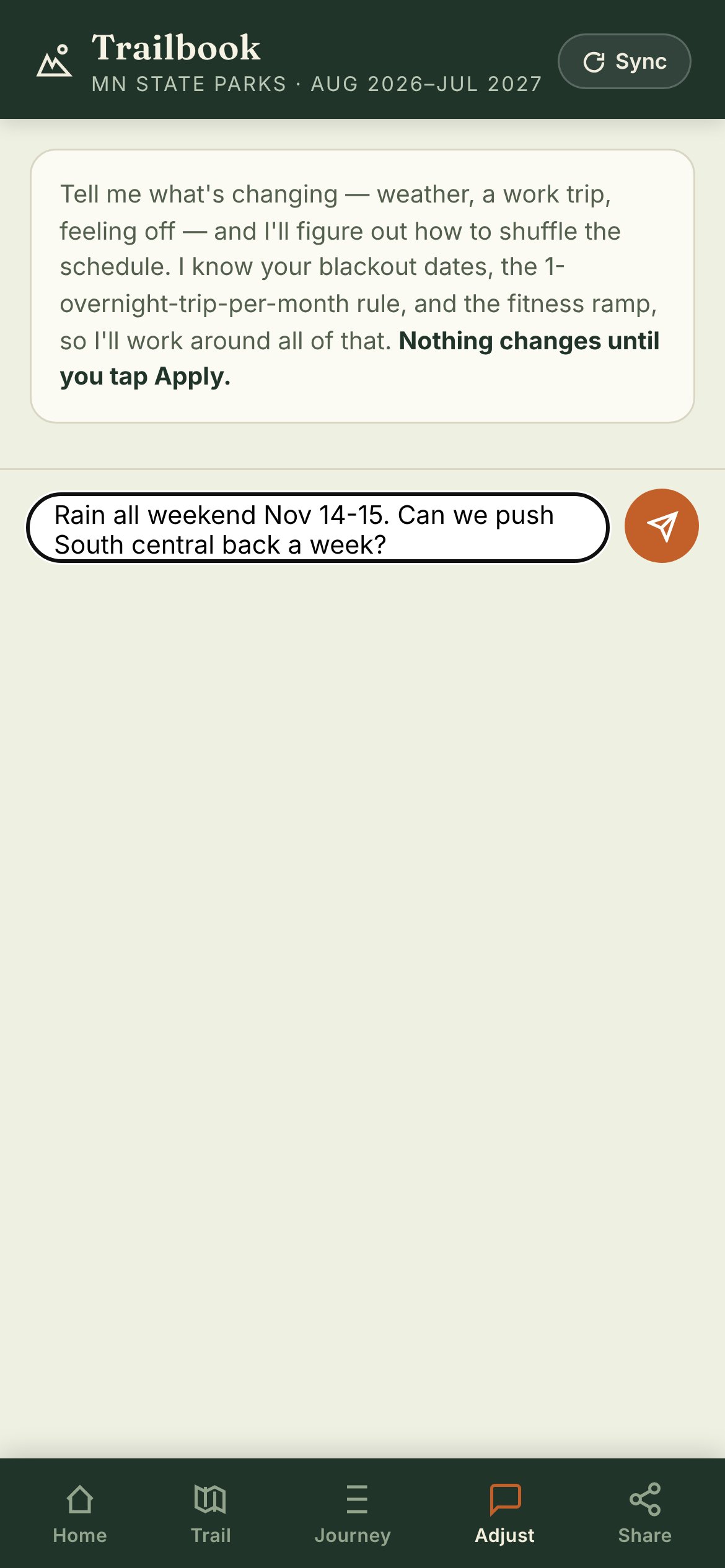
Trailbook home: parks, miles and percent complete, plus the next trip Trailbook journey: all 23 trips in order, tagged day trip or overnight Trailbook adjust tab: asking the assistant to move a trip because of rain
Personal project · Built with Claude

Trailbook

A mobile app to hike all 64 Minnesota state parks in a year. Claude sequenced 23 trips around blackout dates, one overnight a month and a fitness ramp.

When plans change, you say what changed in plain words and the assistant reshuffles the schedule, but nothing changes until you tap Apply.

What it taught me: the AI proposes and the person decides. It's the same rule behind the agentic Access Manager.

Screens show sample progress.

What building it taught me

Define it before you prompt it

I wrote down the purpose, requirements and architecture first, like a brief for a teammate. Clear intent made the output predictable.

Turn intent into instructions

I translated those decisions into prompts and context the model could act on, including the rules it should never break.

Iterate like a designer

Each round, I reviewed the build, refined the visual style and tightened the prompts until it worked the way I meant.

Working with me
Amy Yu
About

Designer, researcher, leader. Now building with AI.

I started in design as the voice of the user, and picked up research out of necessity until it became a full-time role. I've done both research and design at Symantec, Optum, UnitedHealth Group and Pipefy, built and led a design team at UnitedHealth Group, and mentored junior UXers throughout my career. Now I bring all of it to AI.

Today I am a lead designer on a national federal health care program, using Codex to go from discovery to working prototypes. Knowing how things get built, and how people actually use them, is what makes those prototypes useful. I'm based in Minneapolis.

How I work

Make sense of it, then make it real

  1. Find the real problem

    Exploratory workshops, service blueprints and jobs to be done get product, engineering and stakeholders agreeing on what matters.

  2. Build it to learn

    I use Claude and Codex to turn ideas into working prototypes, including agentic ones, fast enough to test while decisions are still open.

  3. Hand off something real

    Engineering gets a working, accessible reference instead of static screens, so less is lost in translation.

Contact

Available January 2027 for staff-level UX architect, product design, and UX lead roles, contracts, and workshop-to-prototype engagements. Remote or Minneapolis-area hybrid.